
Three Export Formats
Export to PDF, Markdown, or JSON. Choose your format with one click — each optimized for its use case.
One click to save any ChatGPT, Gemini, or Google AI Studio chat as a perfectly formatted PDF, Markdown, or JSON file. Download and keep your AI conversations locally — fully private, no servers, no cloud.
Local only · No data leaves your browser · No account required
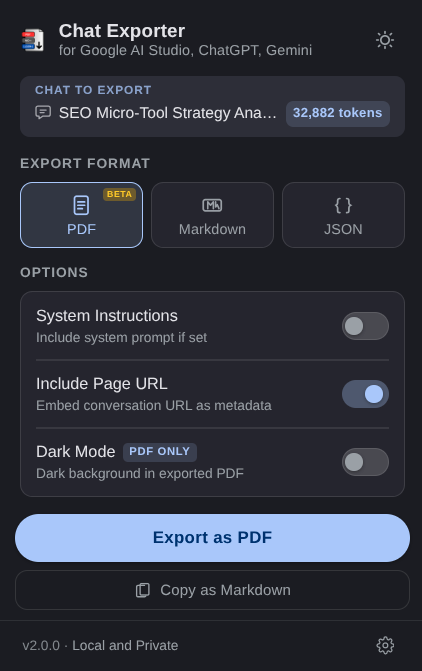
Chat Exporter is a free Chrome extension that exports ChatGPT, Gemini, and Google AI Studio conversations to PDF, Markdown, and JSON files. All processing happens locally in the browser — no data is sent to any server.
Export to PDF, Markdown, or JSON. Choose your format with one click — each optimized for its use case.
Skip the file entirely. One click copies the full conversation as Markdown — paste straight into Notion, Obsidian, or GitHub.
Files are named from your first message. No more "untitled-export-37.pdf" — get meaningful names automatically.
Export PDFs with a dark background and light text that matches your chat's aesthetic. Code blocks, headers, all tuned.
No server, no API calls, no analytics, no account. Your conversations are processed entirely in your browser and never leave your device.
ChatGPT, Gemini and AI Studio use virtual rendering. The extension performs an intelligent multi-pass scroll to capture every turn — even in 100+ message chats.
Navigate to any conversation in ChatGPT, Gemini, or Google AI Studio.
Click the Chat Exporter icon in your Chrome toolbar. Pick your format and options.
Hit Export Now or Copy. Your file downloads instantly — or it's in your clipboard. Runs in under 3 seconds for most chats.
Beautiful, shareable, ready to send.
ChatGPT / Gemini
Here's a Python function that handles pagination efficiently:
def paginate(items, page=1, size=20): start = (page - 1) * size return items[start:start+size]Supports dark mode, code blocks, tables, inline formatting, and system instructions.
Perfect for pasting into Obsidian, Notion, or any Markdown editor.
### User
How do I handle API rate limits?
---
### ChatGPT / Gemini
Implement exponential backoff with
jitter. Here's a pattern...
Paste directly into any markdown editor. Works with Copy as Markdown for instant clipboard access.
Use exported JSON to feed into Python scripts, analysis tools, or AI pipelines.
{
"role": "model",
"content": "Use retry...",
"model": "gemini-2.5-pro",
"systemInstruction": "..."
}
Pipe into scripts, LLM pipelines, or databases. Structured and machine-readable.